
Autonomous Community Guardian
Echo protects your community while you sleep.
Observe. Reason. Act. The first AI that understands Voice & Text context to resolve conflicts before they escalate.
Core Capabilities
Multimodal Reasoning
Echo listens to Voice channels and correlates shouts with chat logs using Gemini 3 Long Context. It sees the whole picture.
Ephemeral Voice Privacy
Your voice is never stored. Echo streams audio, converts it to semantic meaning, and discards the raw file instantly.
Dual-Threshold Action
Low tension? Echo nudges with a summary. High conflict? Echo steps in verbally to de-escalate.
Community 'Heartbeat'
Visualize your server's stress levels in real-time. The Dashboard tracks the emotional pulse of your community.
Live Demo
From Noise to Signal
Technical Architecture
System Flow
Input
Discord Voice Streams
+ Chat Logs
Process
Gemini Live (Audio)
+ Sentiment Analyzer
Output
Semantic Server State
(Stress: High/Low)
Action
Autonomous Intervention
or Mod Alert
Adaptive Personality
One AI. Two Modes.
Echo adapts its vibe to the medium. It's a natural member of the squad in chat, but a professional guardian in voice.
In Chat
The "Cool Friend"
Chill, witty, and lowercase. Echo remembers your lore, jokes about bad takes, and feels like part of the crew.
In Voice
The "Silent Guardian"
Respects the flow. Remains silent during banter. Only speaks to de-escalate aggression or answer safety requests.
Admin Insights
See what you can't hear.
Community isn't just about message volume. It's about vibe. Echo's dashboard visualizes the "Heartbeat" of your server—tracking tension spikes, topic clusters, and intervention history in real-time.
- ✓ Real-time Stress Graph (Server Mood)
- ✓ Intervention Audit Logs
- ✓ Trending Topic Cloud
Dashboard Preview
Method 01
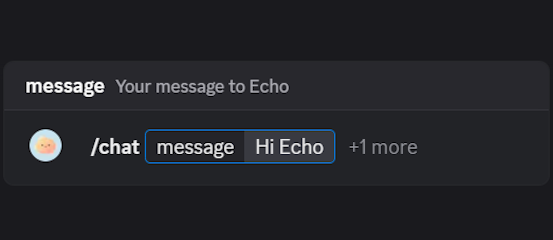
Slash command `/chat`
Type the slash command anywhere Echo is present. Add your message plus an optional attachment (image, txt, pdf) for added context.
/chat attachment: roadmap.png (optional)
Method 02
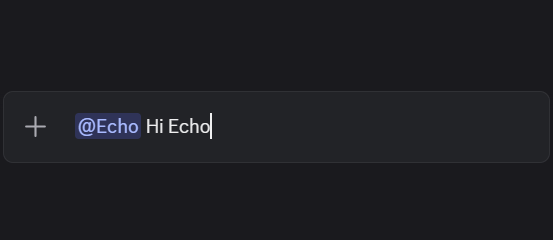
Mention Echo directly
Treat Echo like another teammate. Mention it in a thread or send a DM and continue the chat seamlessly.
(Works in channels, threads, and direct messages.)
Voice Presence
Hang out with Echo in live voice channels
Echo can now join any Discord voice channel to talk things through in real time. Start a jam session, plan raids, or keep coworking vibes going without leaving your VC.
How to start:
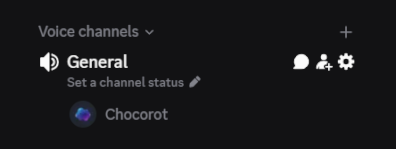
- Join a voice channel in your server with Echo.
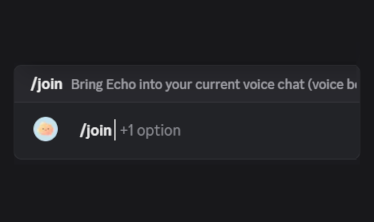
- Type /join anywhere to kick off the voice session.
Command usage
/join voice:(optional)
The voice parameter picks Echo's speaking style (e.g., cozy, energetic). Leave it out to use the default voice.
Ready to wrap up? Just tell Echo to leave in chat and the bot will disconnect politely.
Step 1 · Join the voice channel
Step 2 · Use /join
Under the Hood
Detailed Capabilities
Power tools found deep in the codebase.
Capability A
Semantic Moderation
Forget memorizing commands. Just ask using natural language.
"Echo, ban @user for being toxic about the release."
"Timeout @spammer for 10m."
Capability B
Natural Role Manager
Echo acts as your server administrator. No dashboard needed.
"Give everyone the 'Event' role."
"Make a 'Winner' role with color gold."
Capability C
Multimodal Vision
Echo can see what you share and understands context.
Upload a screenshot? Echo analyzes the error.
Share a meme? Echo understands the joke.
Meet the creators
Built by Chocorot & mewHacks
Echo is crafted and maintained by Chocorot and mewHacks, who keep the model tuned for cozy chats, lore-accurate replies, and community-safe behavior. Need support or feature requests?
“Echo should feel like the friend who always remembers the last thing you said. It reads the room, respects your server rules, and gives you answers without leaving Discord.”
— Chocorot
Bring Echo home
Spin up rich AI chats in under a minute
Invite the bot, choose your favorite channel, and start talking. Echo responds instantly, supports attachments, and keeps context from thread to thread.